Extras (add-ons)
Extras are optional, paid add-ons that can be added to a booking — for example early check-in, cot hire, or a breakfast hamper. Unlike charge types (which are the fees and taxes your business levies), extras are things a guest or a staff member chooses to add. This page builds the catalogue of extras; applying them to a specific booking is documented in the bookings section.
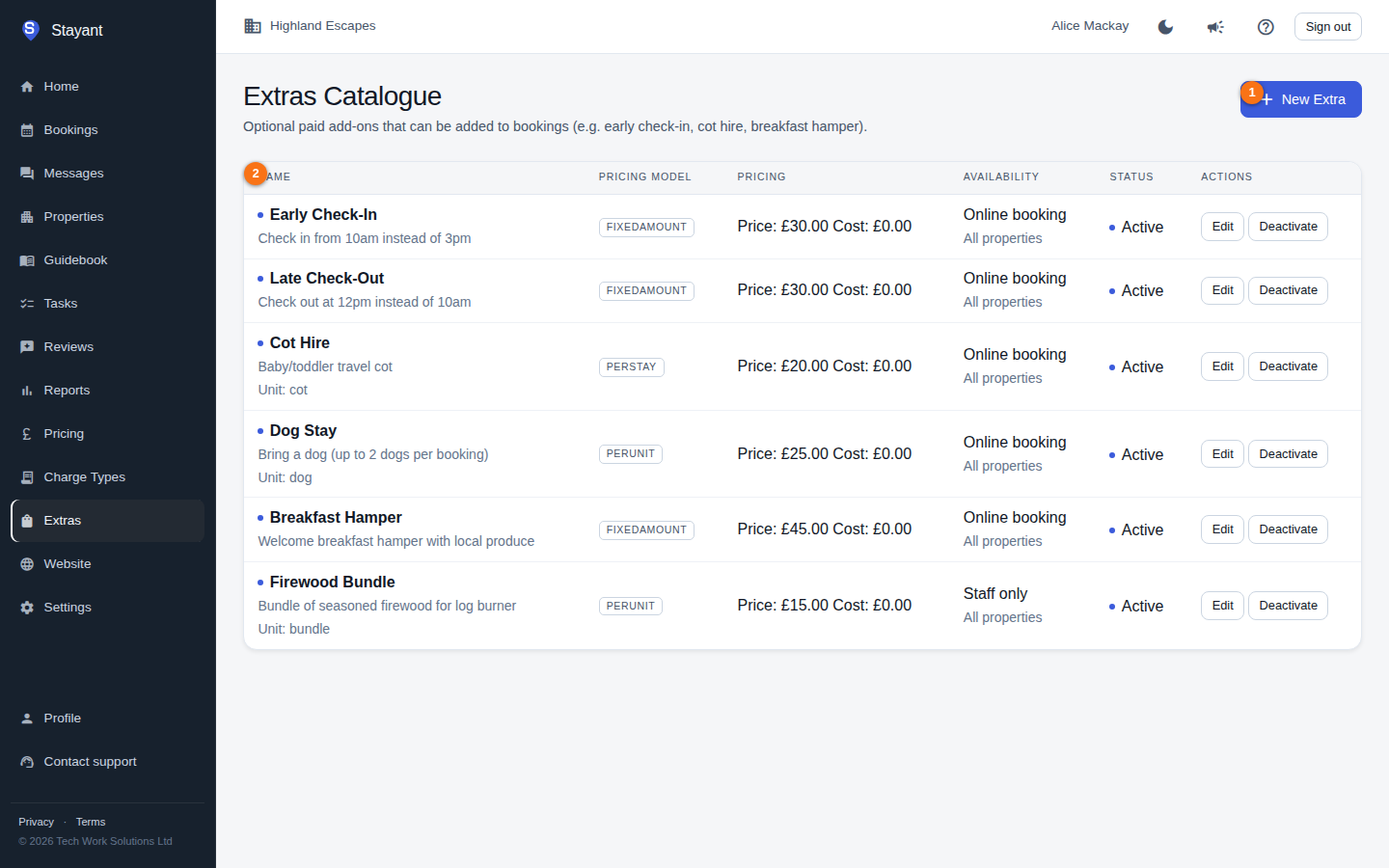
Open Extras from the main menu (/settings/extras); the page is titled Extras Catalogue. Click New Extra (①) to open the create form. When you have extras, the list (②) shows each one's name, pricing model, default price, default cost, whether it's available online, its property availability, and active/inactive status.
Creating or editing an extra
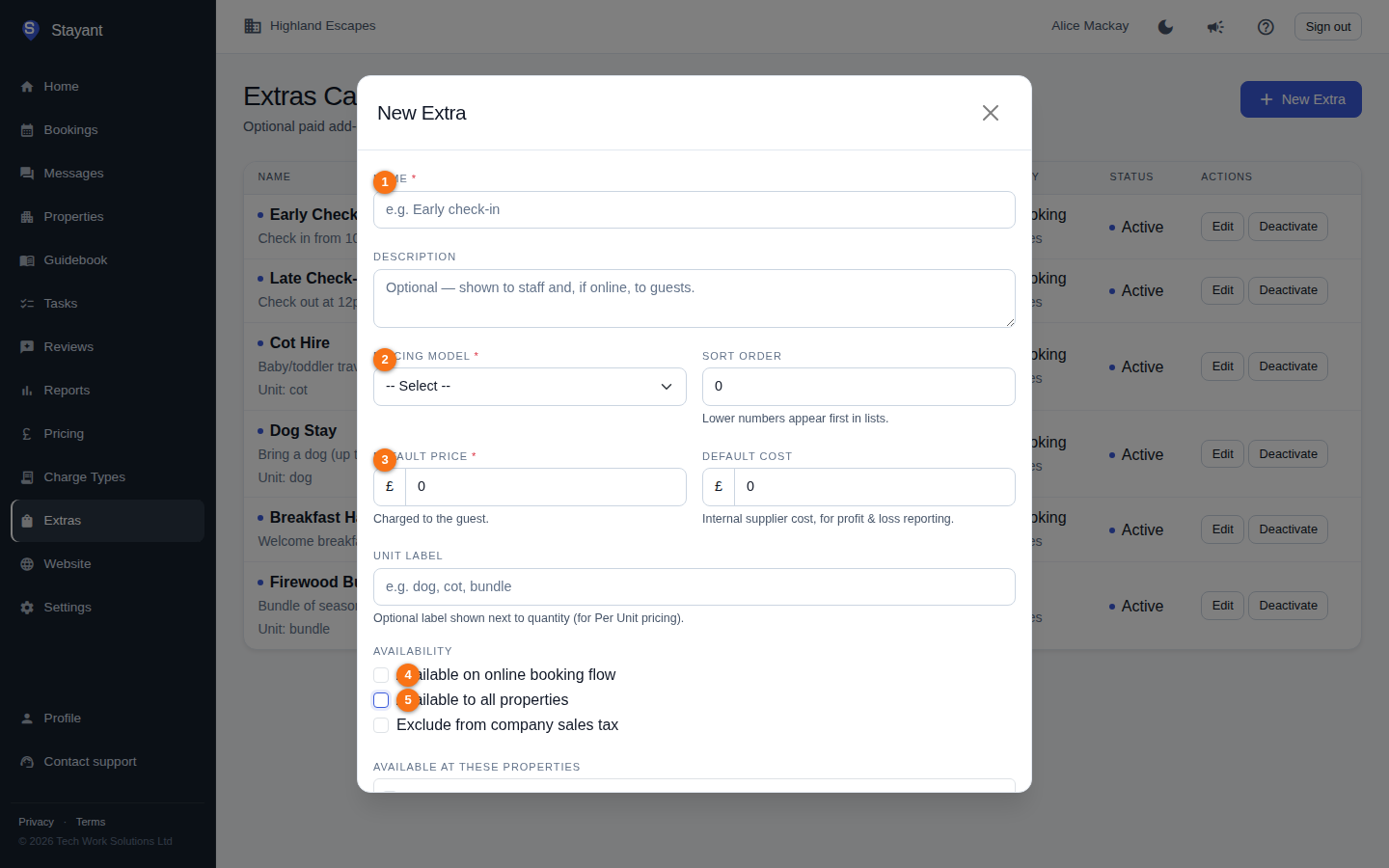
Click New Extra (or Edit on a row; on a phone, tap the row) to open the form. The key fields are Name (①), Pricing Model (②), Default Price (③), Available on online booking flow (④), and Available to all properties (⑤ — untick it to scope the extra to specific properties):
 <!-- TODO(screenshots): the capture now unticks "Available to all properties" (badge 5), but the
per-property picker it reveals sits below the dialog fold, so it still isn't visible in the
shot. Needs the modal scrolled (or a taller viewport) to capture it. -->
<!-- TODO(screenshots): the capture now unticks "Available to all properties" (badge 5), but the
per-property picker it reveals sits below the dialog fold, so it still isn't visible in the
shot. Needs the modal scrolled (or a taller viewport) to capture it. -->
- Name (①, required) — e.g. "Early check-in".
- Description — optional free text.
- Pricing Model (②, required) — how the price is applied:
- Fixed Amount — a flat sum.
- Per Stay — once per booking.
- Per Night — multiplied by the number of nights.
- Per Guest — multiplied by the guest count.
- Per Unit — multiplied by a quantity (use the Unit Label to describe what a unit is).
- Default Price (③, required) — the price charged to the guest.
- Default Cost — your internal supplier cost, used for profit-and-loss reporting. Not shown to guests.
- Unit Label — optional label shown next to the quantity, used with Per Unit pricing (e.g.
dog,cot,bundle). - Sort Order — controls ordering in lists.
- Available on online booking flow (④) — when ticked, guests can select this extra for themselves while booking online on the property page (
/properties/{slug}); their chosen quantity is written to the booking and included in their payment total at/guest/{token}/pay. When off, it can only be added by a staff member (from the booking creation form or the booking's Charges and extras card) — guests never see it. - Available to all properties — ticked by default, so the extra is offered for every property. Untick it to reveal a property picker: a checklist of your active properties. The extra is then offered only for the properties you tick — everywhere extras are offered, including staff booking creation, the booking detail + Add extra control, and the guest online booking form.
- Exclude from company sales tax — leaves this extra out of your company sales-tax calculation. On your booking site the guest's price panel follows the same rule: a ticked extra is added to the subtotal and, unless it's excluded, to the amount VAT (or your sales tax) is worked out on, so the total the guest is quoted is the total the booking is billed.
Click Save to store the extra.
Activating and deactivating
Each extra is Active or Inactive. Use the Deactivate / Activate buttons on a row to toggle it. Deactivating keeps the extra in the catalogue but stops it being offered for new bookings; it isn't deleted, so bookings that already include it are unaffected.
Charge types vs extras
Both are catalogues of money items, but they serve different roles:
- A charge type is a fee, tax, or deposit your business applies — often mandatory and sometimes flagged to apply automatically to every booking.
- An extra is an optional add-on the guest or staff opts into, with its own pricing model, an optional set of properties it's limited to, and an option to let guests select it for themselves during online booking.