Blocked dates & the booking horizon
Under Settings → Weekend days & availability (the Availability rules card on that page — direct
link /settings/pricing), two independent switches control which nights are bookable at all,
tenant-wide:
- Block dates with no price set
- Booking horizon — Off, up to a fixed date, or a rolling number of months
Both are off by default. Nothing changes until you deliberately turn one on.
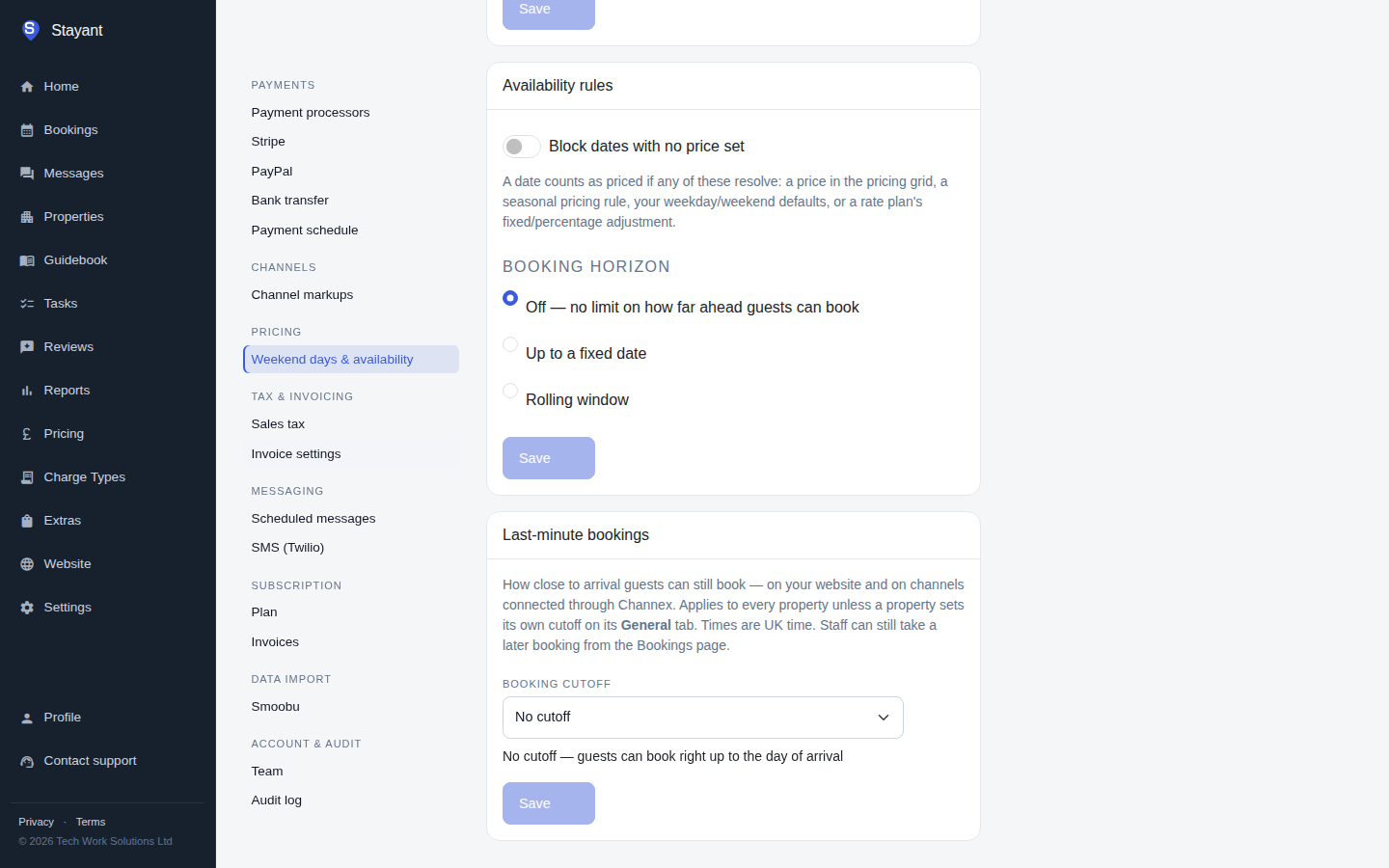
Block dates with no price set
Turn this on and a night becomes unbookable the moment nothing prices it.
A date counts as priced if any one of these resolves a rate for it:
- A price you've entered directly in the pricing grid.
- A seasonal pricing rule covering that date.
- The room's weekday/weekend default price (the Wd / We defaults in the pricing grid).
- A rate plan's own fixed or percentage adjustment.
If a room has more than one active rate plan, a night is only blocked when none of the room's active plans price it — one plan pricing the night is enough to keep it bookable, even if every other plan on that room is silent for that date.
Booking horizon
Caps how far in the future a guest — or your own staff — can book:
- Off — no limit on how far ahead guests can book (the default).
- Up to a fixed date — pick a calendar date. That date is the last bookable night; it is still bookable itself, only nights after it are blocked.
- Rolling window — a number of months counted forward from today, recalculated every day. Minimum 1 month, maximum 120 months.
However you set the cutoff, checkout day is never a "night." If your cutoff is, say, 30 June, a stay that checks in on 30 June and checks out on 1 July is fine — its only night is the 30th, which is the cutoff night itself and so still bookable; 1 July is only a checkout day, not a night the guest occupies.
Gotcha — a fixed date left in the past blocks everything. If you pick "Up to a fixed date" and that date quietly passes (nobody comes back to update it), the last bookable night is now behind today, so every future night is blocked — the whole calendar closes. The settings page shows a warning banner under the date field when this happens ("This date has passed, so all dates are currently blocked."), but nothing stops you saving a stale date in the first place, and nothing alerts you afterwards. If you use a fixed date, check back on it periodically or switch to a rolling window instead.
What turning either rule on actually does
Enabling either rule — the unpriced-dates toggle or a booking horizon — closes availability everywhere at once:
- On your public website, the blocked nights simply stop showing as available.
- In the app, staff creating or editing a booking are blocked from the same dates a guest would be — this is not a guests-only restriction.
- On every Channex-connected channel (the OTAs synced through Channex — Airbnb, Booking.com, etc.), the same dates are pushed out as closed automatically, so a guest can't book around the restriction there.
If a channel only syncs through the outbound iCal feed (not through Channex), it does not currently receive these blocks. That feed publishes every non-cancelled booking (including unpaid Drafts, not only confirmed ones) plus manual date blocks on the property's default room only — per-room blocks on other rooms, and tenant-wide blocks, aren't included. A policy-blocked night (unpriced, or past the booking horizon) is invisible to it either way, so a channel reading nothing but your iCal feed can still show and sell those nights. If you rely on iCal syncing rather than Channex, block the affected dates on that channel directly as well.
Because of that blast radius, Stayant asks you to confirm before turning either rule on — you'll see a dialog warning that this closes availability on your website and every connected channel as soon as you save. Turning a rule off, or switching between the two horizon modes once one is already on, doesn't ask again — only the Off → on transition can newly restrict something a guest could previously book.
Where this doesn't apply
A booking that's already confirmed for dates that later become blocked isn't cancelled or otherwise disturbed, and it stays editable — you can still fix a guest's phone number, adjust guest counts, or update notes on it, even though its nights are now policy-blocked, because neither its dates nor its room are changing.
That carve-out is narrow, though:
- Editing the booking into a blocked date range is still rejected — extending a stay, or moving its check-in/check-out onto now-blocked nights, is treated exactly like a new booking request.
- Moving the booking to a different room on the same dates re-checks the policy against the new room — if those nights are unpriced or past the horizon on the room you're moving it to, the move is rejected, even though the original room/dates combination would still have been fine.
In short: an existing booking is only exempt from these rules while it keeps occupying exactly the room and nights it already had. Any change to which nights or which room it occupies is re-validated against the current rules, same as a brand-new booking.