Promotion codes
A promotion code is a code a guest types at checkout on your booking site to get money off. You can also enter one on the New Booking form when you take a booking by phone. Each code takes either a percentage or a fixed amount off, and you decide which part of the booking it applies to.
Two kinds of code share the same settings:
- An open promotion — anyone who has the code can use it. For example
OCTOBER20for 20% off every stay booked in October, capped at the first fifty bookings. - A code for one guest — restrict the code to a guest's email address and it only works on a booking made with that email. Use it for a goodwill gesture or a repeat-booking offer. A guest-restricted code is single-use unless you say otherwise.
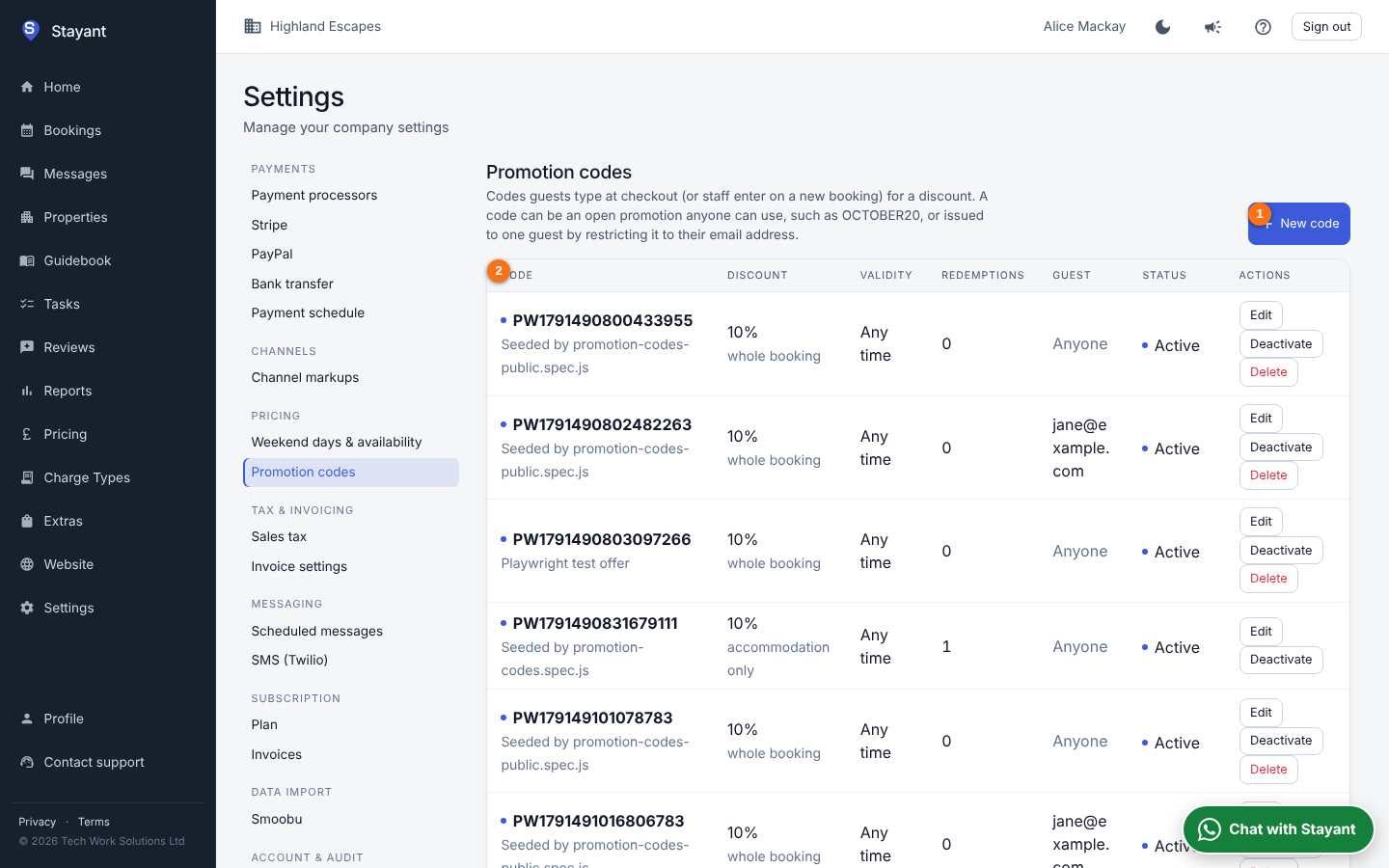
Open Settings → Pricing → Promotion codes (/settings/promotion-codes). Click New code (①) to create one; the list (②) shows every code with its discount, validity, how many times it has been used and, for a restricted code, the guest it was issued to.
Creating a code
Click New code (or Edit on a row; on a phone, tap the row). The fields are:
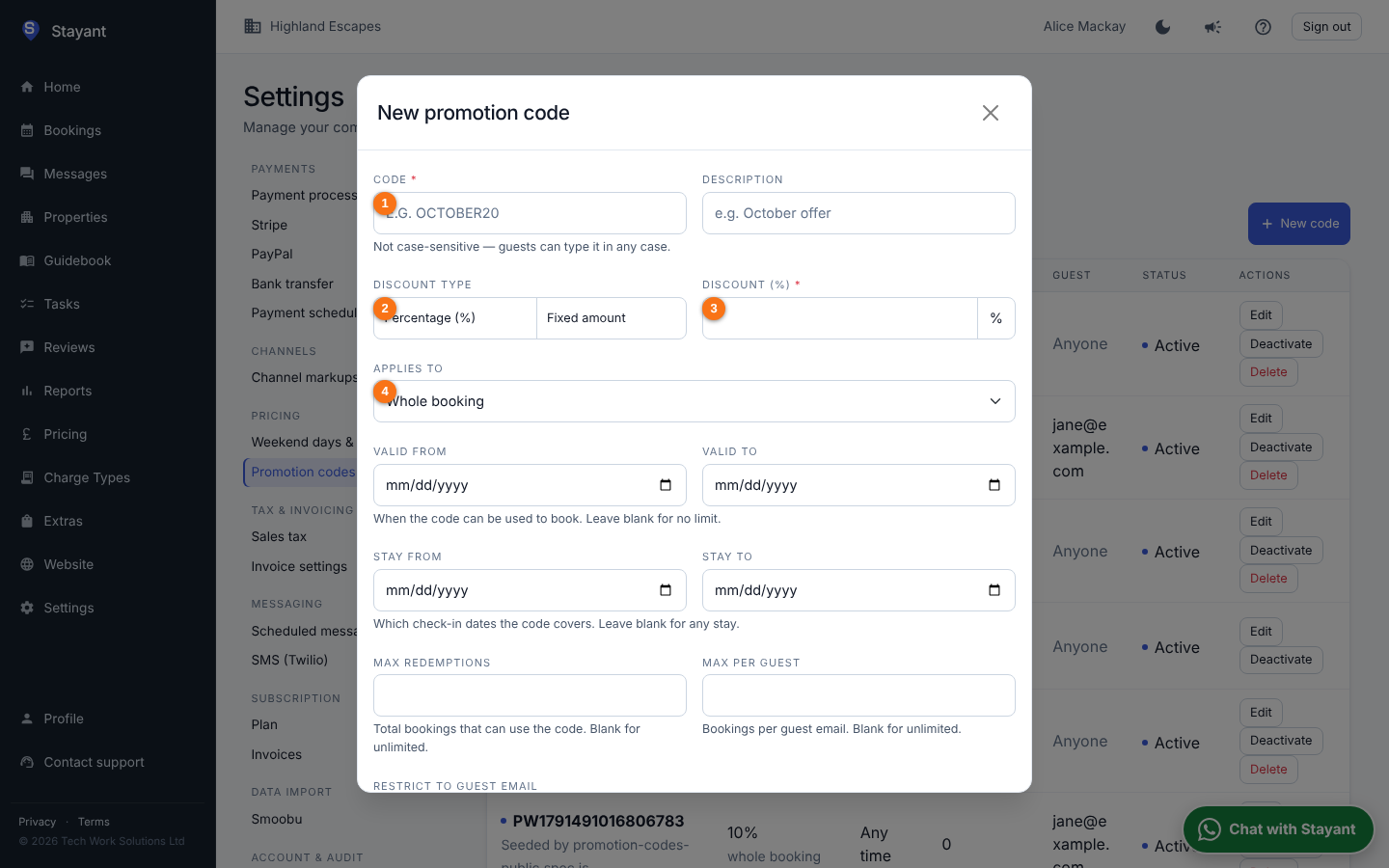
- Code (①, required) — what the guest types. Letters and numbers, no spaces; it is saved in capitals and guests can type it in any case.
- Description — a note for you ("October mailing list"). Guests never see it.
- Discount type (②) and Value (③) — Percentage (e.g. 20%) or Fixed amount (e.g. £25). A fixed amount is capped at the part of the booking it applies to, so it can never take a booking below zero.
- Applies to (④) — which lines the discount is measured against: the whole booking, accommodation and charges, or accommodation only (extras and charges then stay full price). This is the same choice as a discount you set on a booking.
- Valid from / to — the dates between which the code can be used. Leave both blank for a code that never expires.
- Stay from / to — the code only applies when the guest's check-in falls in this window. Use it for a seasonal offer on October arrivals that guests may book any time.
- Max redemptions — how many bookings can use the code in total. Leave blank for unlimited. A cancelled booking or an abandoned checkout gives its use back.
- Max per guest — how many times one guest (by email) can use the code.
- Restrict to guest email — only a booking made with this email can use the code. Filling this in sets Max redemptions to 1 unless you have already set it. The guest is never told which email a code belongs to.
- Applies to all properties — untick to limit the code to selected properties.
Click Save. A code is active as soon as it is saved; Deactivate stops it without deleting it. A code that has never been used can be deleted; one that has been used on a booking can only be deactivated, so the booking's history stays intact.
How guests use a code
On the property page of your booking site the booking form has a Have a promo code? link under the optional extras. The guest types the code, clicks Apply, and the price panel shows a Promo code line with the amount off and the new total. If the code cannot be used, the reason is shown under the field — for example That code has expired or That code doesn't apply to these dates — and the price is unchanged.
A code restricted to one guest is checked against the Email the guest has typed on the form, so the guest is asked to enter their email before the code is applied.
The code is checked again when the guest confirms the booking, so a code that ran out or expired between the quote and the confirmation is refused with the same message.
Where the discount shows
A redeemed code becomes an ordinary booking discount labelled Promo code OCTOBER20. It appears everywhere a discount does: the price breakdown at checkout, the booking confirmation email, the invoice, the guest portal and the booking's Financials card in the management app. The deposit and balance are calculated on the discounted total.
Codes on staff bookings
When you take a booking on the New Booking form, type the code into Promo code and click Apply. The Discount block fills in from the code and is locked; click Remove on the discount to drop the code. The guest's email on the form is used for a guest-restricted code.
Tips
- Promotion codes stack on top of a length-of-stay discount: the stay discount is applied first and the code works off the reduced price.
- Only one code can be used per booking.
- Codes are not sent to booking channels such as Booking.com or Airbnb; they apply to direct bookings only.