Collecting guest reviews
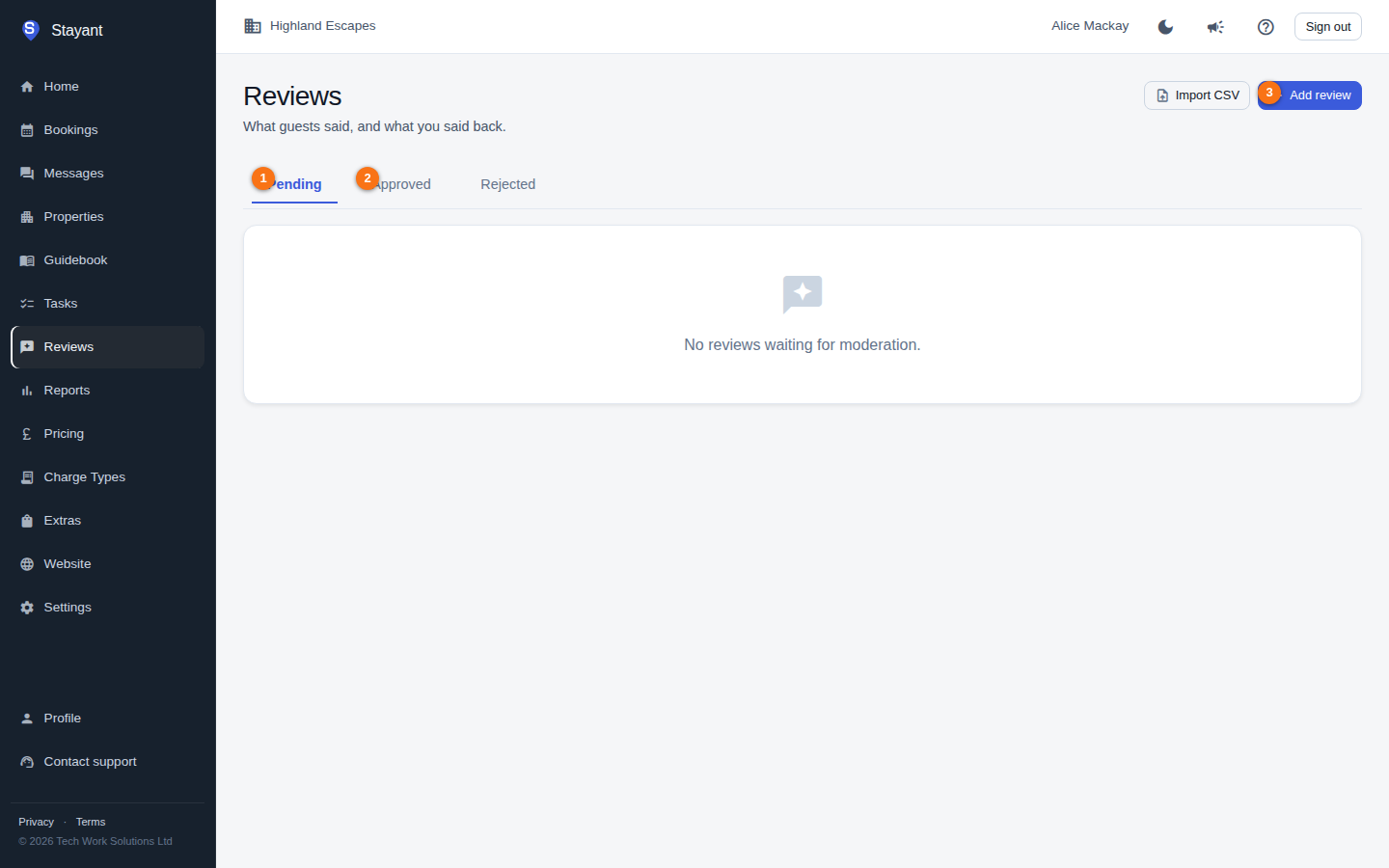
The Reviews page (Reviews in the main navigation, or go to /reviews) is where every review for your account lives. Reviews come from three places:
- Automatic guest requests — after a guest checks out, Stayant emails them a link to leave a review.
- Manual add — you type in a review you received elsewhere (Airbnb, Booking.com, Google, direct feedback).
- CSV import — bulk-load reviews exported from another platform. See Importing reviews.
The status tabs
Reviews are grouped into three tabs, each showing a count badge when it has items:
- Pending (①) — guest submissions waiting for you to approve or reject. Nothing here is visible to the public yet.
- Approved (②) — published reviews, visible on your public site.
- Rejected — reviews you've turned down (or unpublished). Not visible anywhere.
Use Add review (③) to enter a review by hand, or Import CSV to bulk-load reviews.
Each card shows the star rating, the review title and body, the guest's name and country, the review date, the property it relates to (or Account-level for a manually added or imported review that isn't tied to one property), and the booking reference where there is one. Reviews brought in from another platform also show a "via Airbnb / Booking.com / …" label, which links back to the original if a source URL was supplied.
How guests are asked for a review
Stayant sends review requests automatically — as long as your plan includes Guest Reviews, there is nothing to switch on. An hourly background job looks for confirmed bookings whose checkout was at least a day ago and emails the guest a "How was your stay?" message containing a personal link to a review form on your public site.
- A guest is only ever emailed once per booking, and only if the booking has a guest email on file.
- To avoid spamming guests during onboarding, the job only looks back about a month after checkout — older historical bookings are not chased for reviews.
- When the guest submits the form, their review lands in the Pending tab for you to moderate. It does not appear on your public site until you approve it.
Moderating and replying to reviews is covered in Replying and publishing reviews.
Adding a review by hand
If you already have a review from somewhere else and just want to add one, use Add review (top of the page):
- Click Add review.
- Optionally pick the Property the review is about. Leave it blank for a general, account-level testimonial that isn't tied to a single property.
- Choose the Rating (①, 1–5 stars) and the Reviewed on date (the date it was originally written).
- Pick the Source — Airbnb, Booking.com, VRBO, Google, Direct feedback, or Other.
- Add a Title (optional) and the review Body (②, required).
- Enter the Guest name (③, required) and optionally their Country.
- Optionally paste a Source URL — the public review card will then link back to the original.
- Click Add review (④).
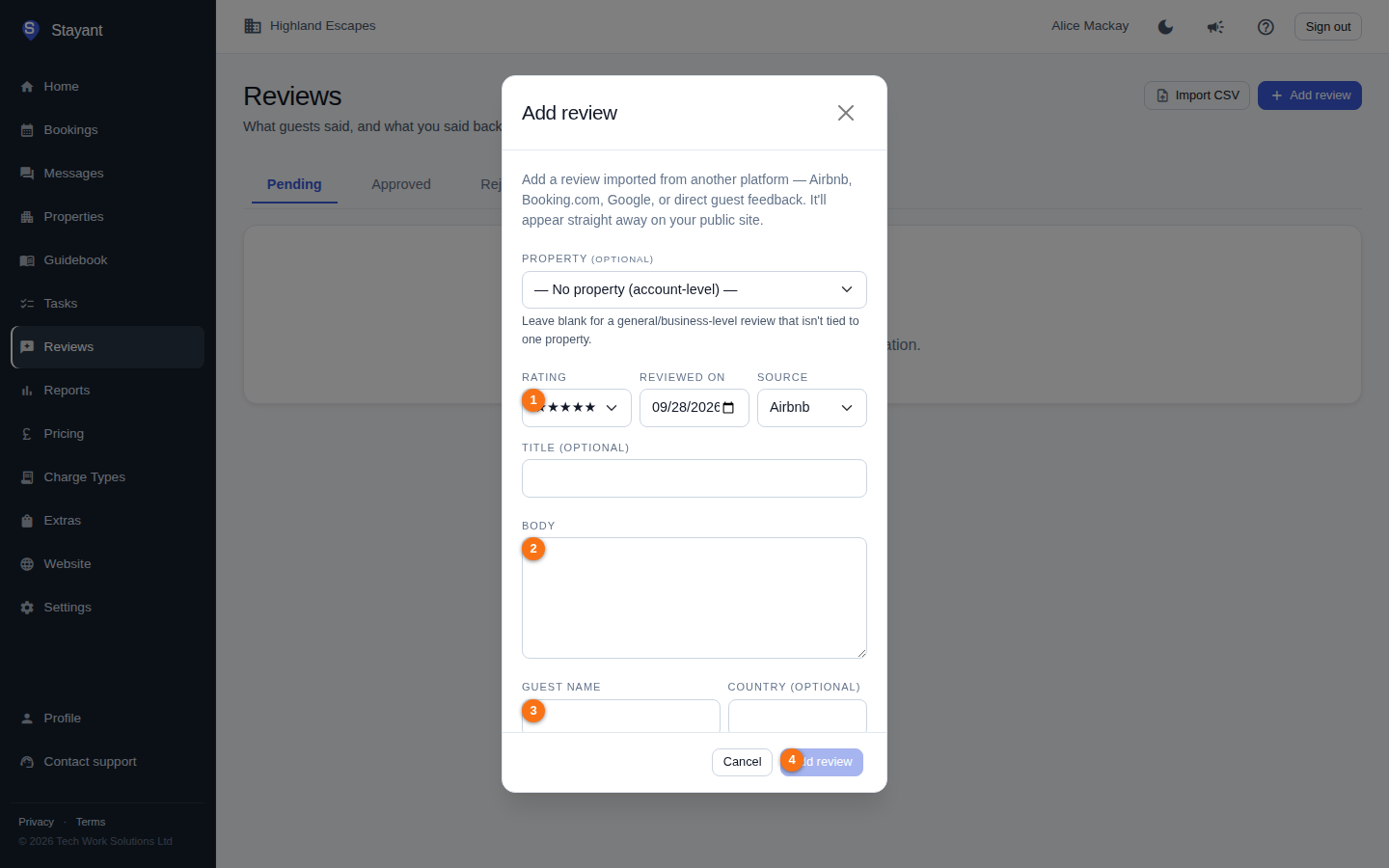
Only the Body and Guest name are required. A manually added review is published immediately — it goes straight into the Approved tab and shows on your public site, so you don't need to approve it.
Browsing large review lists
Each status tab loads 25 reviews at a time. When a tab has more than 25 reviews, a Prev / Next pager appears beneath the list, along with a "Showing X–Y of N" count. Switching to a different tab resets the pager to page 1 for that tab.