Handle a guest's data request
Under UK and EU data-protection law your guests can ask you for a copy of the personal data you hold about them (access or portability) or ask you to delete it (erasure). You are the controller of your guests' data, so these requests come to you. Stayant gives you the tools to answer both from the booking itself.
Only Owners and Admins can export or erase guest data. Managers and Staff don't see the options.
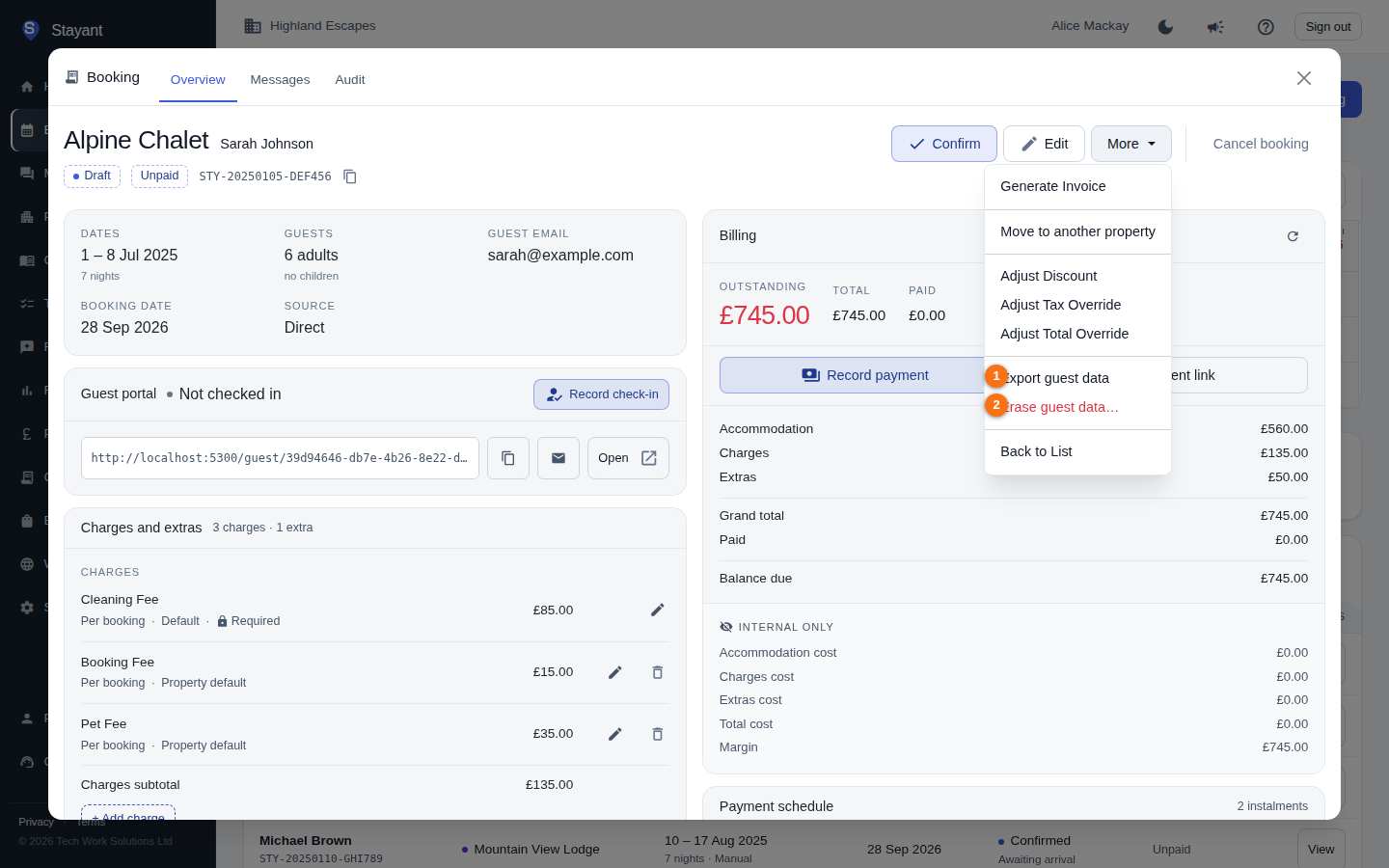
Which bookings count as "the guest"
Stayant keeps the guest's details on each booking rather than in a separate guest record. When you open Export or Erase, the dialog lists this booking and every other booking in your workspace with the same email address (capitals and spaces don't matter), all ticked. Untick any that belong to someone else — for example two people who share an email — before you continue. A booking with no email address, or one already erased, stands on its own.
Export a guest's data
- Open any of the guest's bookings and choose More → Export guest data.
- Check the list of bookings.
- Select Download JSON.
You get a .json file containing, for each booking: the guest's name, email, phone and notes; the
dates, property, room, guest numbers and amounts; their online check-in details (ID document,
vehicle, emergency contact, dietary needs, requests); the message thread; the emails and texts sent
to them; replies they emailed in; their review; payments, refunds and invoice dates; and whether
their guest portal link is active. JSON is a standard machine-readable format, which is what the law
asks for. Send the file to the guest by a secure route.
The guest portal link itself isn't in the file — it works like a key — and neither is the formatted version of each email (the plain-text version is).
Erase a guest's data
- Open any of the guest's bookings and choose More → Erase guest data….
- Check the list of bookings.
- Read what will be erased and what will be kept, tick I understand this can't be undone, and select Erase guest data.
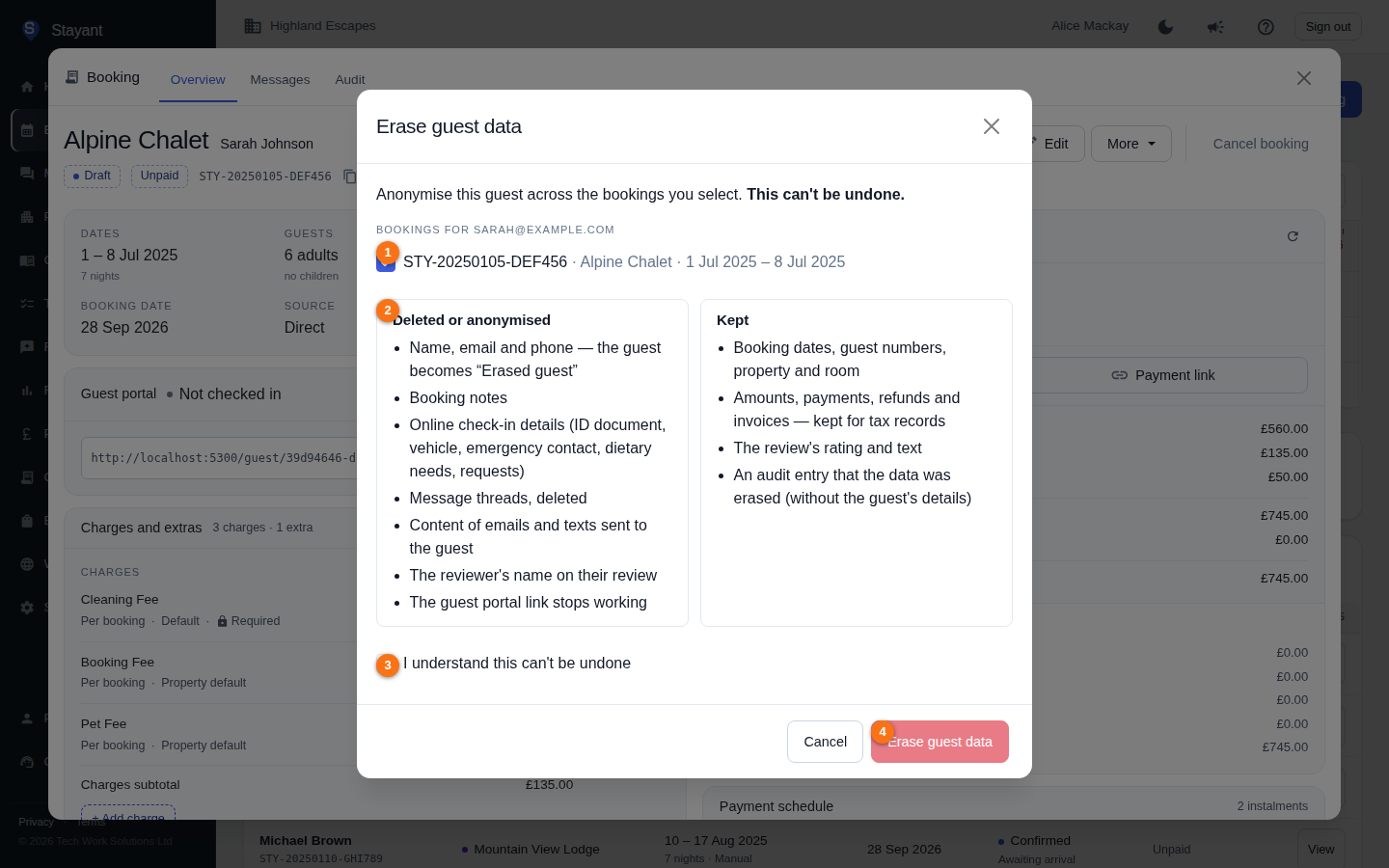
Erased or deleted:
- The guest's name (it becomes Erased guest), email address and phone number.
- Booking notes.
- Online check-in details — ID document type and number, vehicle registration, dietary needs, emergency contact and requests.
- The booking's message thread (deleted), and the content of emails and texts sent to the guest.
- The reviewer's name and country on their review.
- The guest portal link: any link already sent stops working.
- The guest's details in the booking's Audit history. The entries stay, so you can still see
what was changed and by whom, but the old and new values now read
<erased>.
Kept:
- Booking dates, guest numbers, property, room and status.
- Amounts, payments, refunds and invoices. Tax law requires you to keep financial records (six years in the UK), so these stay — without the guest's contact details. Invoices you already generated are kept as issued.
- The review's rating and text. If the guest also wants their review removed, reject or delete it from Reviews.
- An audit entry recording that the data was erased — without the guest's details.
After erasing, the booking shows Erased guest and a Guest data erased note with the date. You can still export it (the file then shows the anonymised booking). Erasing the same booking again does nothing, and if a channel later sends an update for an erased booking, the guest's name and contact details are not put back.
Erasing someone who hasn't stayed yet. If a selected stay is today or in the future, the dialog warns you: after erasing you won't have a way to contact the guest. You may still need their details to host them — you don't have to erase before the stay is over.
Data held outside Stayant
Erasing in Stayant doesn't reach copies held by other services you've connected. If they apply, also deal with:
- Your payment provider (Stripe or PayPal) — the customer and card details they hold.
- The booking channel (Airbnb, Booking.com, Vrbo and others) for bookings that came from them.
- Your own mailbox, if guests emailed you directly.
When you close your workspace
If your workspace is closed, Stayant keeps your guests' data for 30 days — in case you come back — and then anonymises every guest automatically in the same way as Erase, keeping the anonymised bookings and financial records. Before closing, export anything you need.