Last-minute bookings
A booking cutoff is the latest a guest can book a stay before it starts. Use it when you need time to prepare — cleaning, key handover, a welcome pack — and don't want a booking landing an hour before arrival.
You set a default for every property, and any property can have its own cutoff instead.
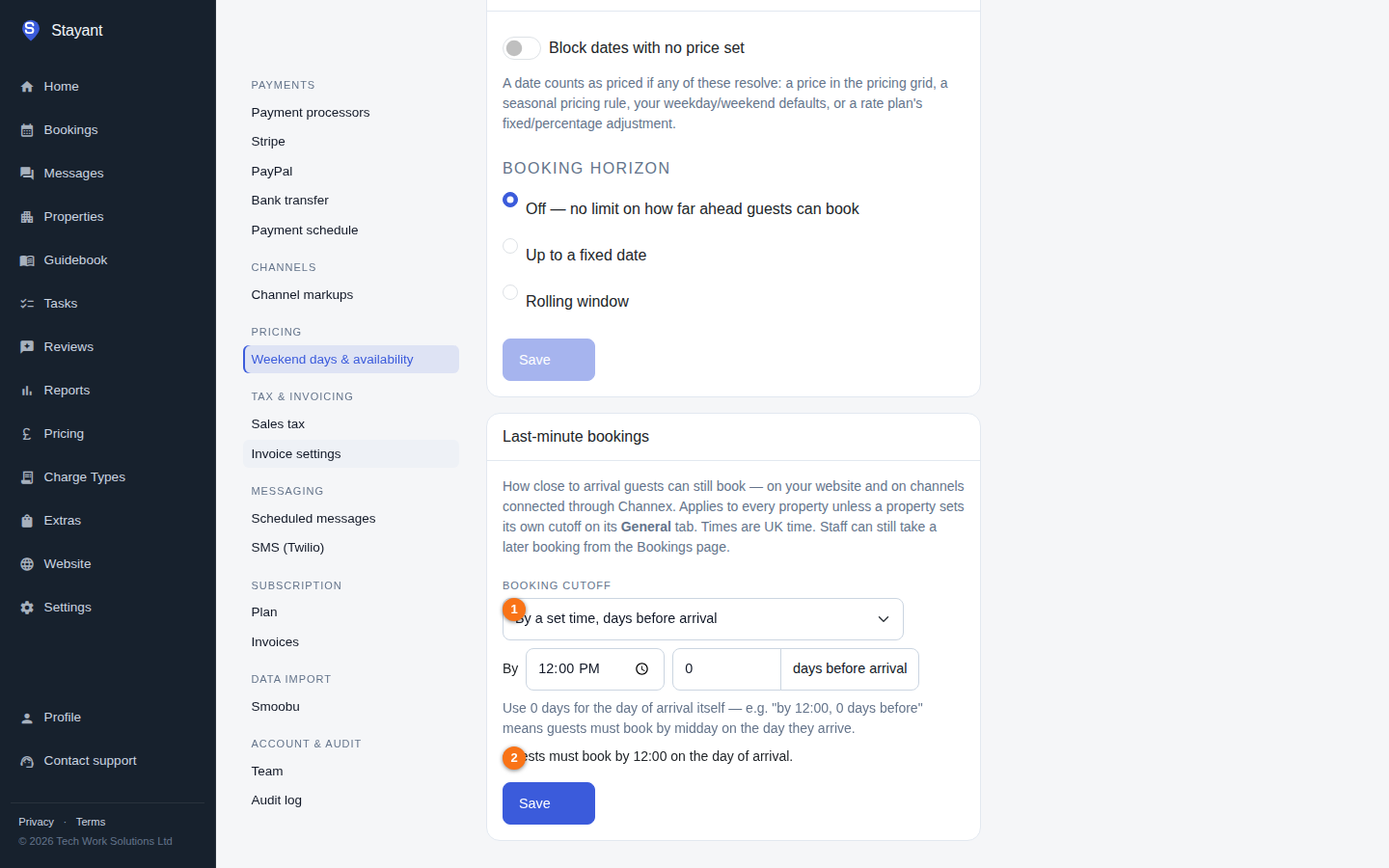
The three choices
| Choice | Example | Means |
|---|---|---|
| No cutoff | — | Guests can book right up to the day of arrival (the default). |
| Hours before check-in | 6 hours | Counted back from the property's default check-in time. With check-in at 16:00, guests must book by 10:00 on the day. |
| By a set time, days before arrival | 12:00, 0 days | 0 days means the arrival day itself, so this is "book by midday on the day". 3 days at 23:59 means "book by the end of the day 3 days before". Up to 30 days. |
Under the choice, Stayant shows the rule in plain English (for example Guests must book by 12:00 on the day of arrival) so you can check it says what you meant.
All times are UK time.
Setting the default for all properties
- Go to Settings → Weekend days & availability (
/settings/pricing). - In the Last-minute bookings card, pick a choice and fill in the hours, or the days and time.
- Click Save.
Giving one property its own cutoff
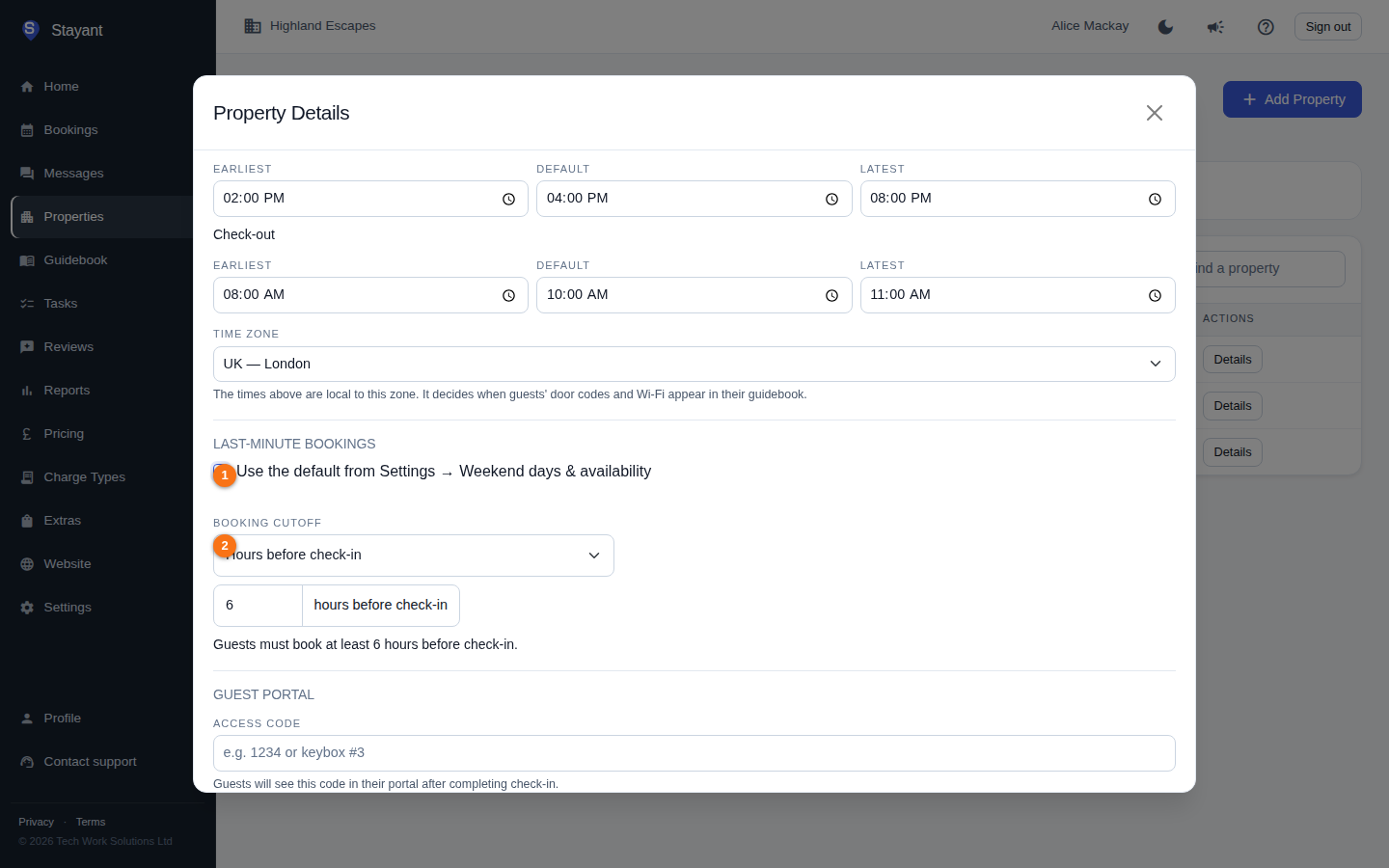
- Open the property and click Edit on its General tab.
- Under Last-minute bookings, untick Use the default from Settings → Weekend days & availability.
- Pick the property's own cutoff and click Save.
Picking No cutoff here turns the cutoff off for this property only, even if your default has one. Tick the box again to go back to the default. The property's General tab shows which cutoff applies under Check-in and check-out.
What guests see
On your website's booking calendar, arrival dates that are too late to book are greyed out, so the first date a guest can pick is the first one still open. If a guest opens a link with a closed arrival date already filled in, they see It is too late to book an arrival on … and Review Booking stays disabled. The booking is checked again when it's submitted, so the cutoff can't be got around.
Airbnb, Booking.com and other channels
If the property is connected through Channex, Stayant also sets Channex's Cut off time and Cut off days for it (in Channex: the property's Settings → Cut off time), so the same rule closes the dates on every connected channel:
- "By 12:00, 0 days before" becomes cut-off time 12:00, same day.
- An hours rule is converted: with check-in at 16:00, "30 hours before check-in" becomes cut-off time 10:00, 1 day before.
- Channex only accepts times on the hour or half hour, so a time in between is rounded down (10:15 becomes 10:00). Channels then stop selling a few minutes before your website does, never after.
When you change the cutoff, Stayant updates Channex straight away and re-sends availability for the next month, so dates that are already too late close immediately (and dates a looser rule re-opens become available again). Don't change the cut-off in Channex yourself — Stayant will overwrite it the next time the property is saved.
Staff bookings and changes
- Staff can still take a late booking. When you create a booking in the app for a closed arrival date, Stayant shows the cutoff in its restrictions warning and lets you choose Book anyway. The override is recorded in the booking's audit log.
- Changing an existing booking only checks the cutoff if you move its arrival date. Changing the departure date, guests or notes on a booking for tomorrow is fine even though tomorrow's cutoff may have passed.
Where this doesn't apply
- Channels synced only by iCal (not through Channex) don't receive the cutoff. Set that channel's own advance-notice setting instead.
- Bookings that arrive from a channel are always accepted: the channel has already applied the cutoff when the guest booked.
- The cutoff controls how late guests can book. To limit how far ahead they can book, use the Booking horizon — see Blocked dates & the booking horizon.