What your plan includes
Each subscription package unlocks a set of Stayant features. Two packages can cost the same but switch different features on, so what you can do in the app depends on the package your company is subscribed to.
On Settings → Plan (/settings/subscription) the packages you can switch to are listed in the Change Package card (①); each is what a plan would unlock.
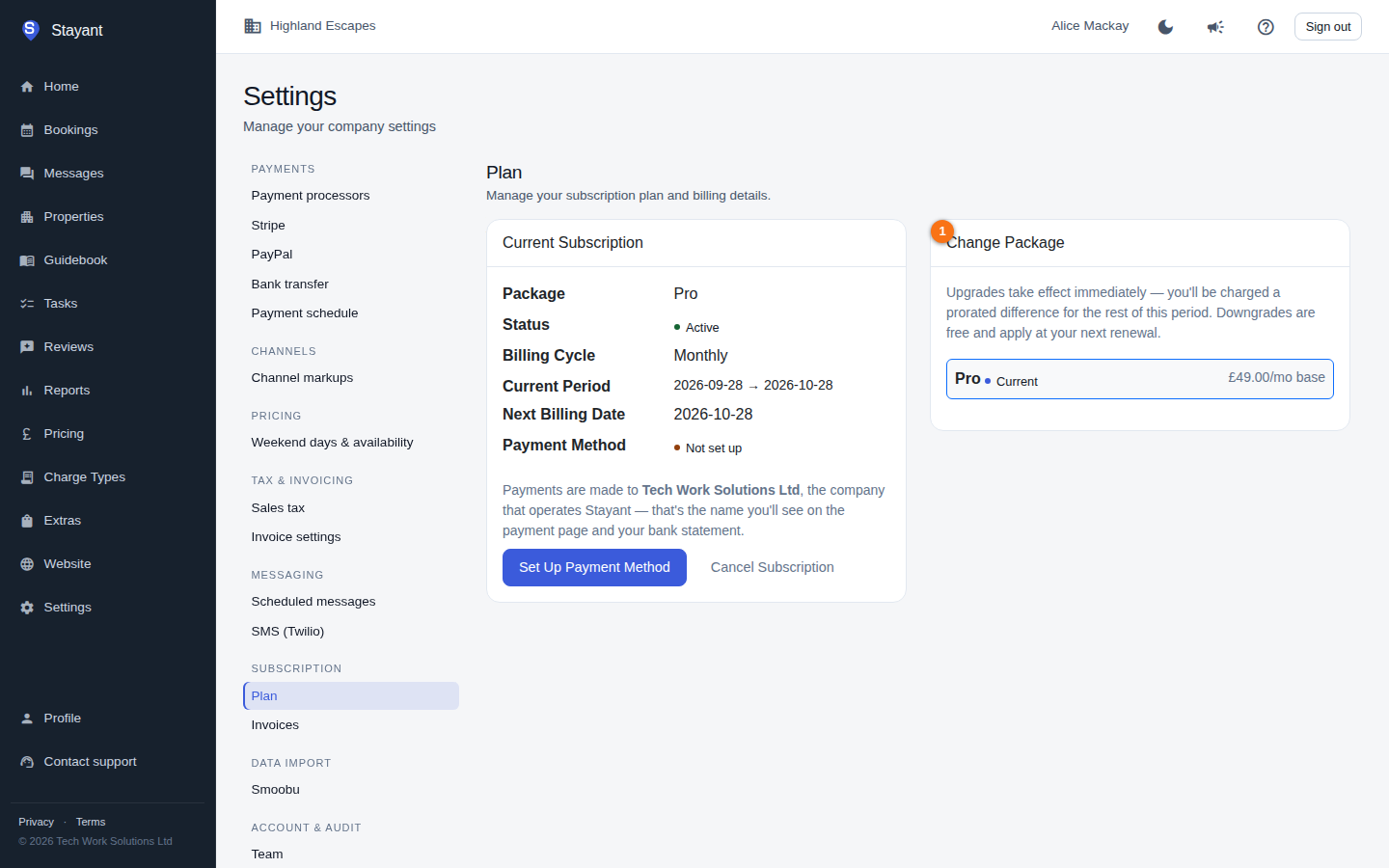
Note: The package list shows each package's name, price, and billing cycle. The detailed per-feature breakdown is configured by Stayant and isn't itemised on the customer subscription page today — the clearest signal of what your plan includes is what appears in the app. If a feature is part of your plan, its pages and menu entries are available; if it isn't, they're hidden.
Features that can be in a plan
A package can include any of these capabilities:
- Booking Restrictions — minimum-nights, blocks, and channel restrictions.
- Task Management — operational task tracking and assignment.
- Messaging — outbound email to guests, outbound SMS (via Twilio), reusable message templates, and scheduled messages tied to booking events.
- Payments — Stripe (cards), PayPal, Apple Pay (via Stripe), and manual bank transfer reconciliation.
- Channels — Channex two-way sync with OTAs, plus iCal import and iCal export.
- Charges — per-booking charges and charge-type defaults.
- Extras — sellable add-ons (cleaning, transfers, and similar) on a booking.
- Public Website Builder — design and publish a public-facing website.
- AI Website Assistant — conversational AI that designs and edits your public website (metered — see Limits).
- Guest Reviews — collect, display, and respond to guest reviews.
- Guests — property guidebooks and the online guest portal for confirmations and payments.
- Analytics — pageview and event analytics for your public site.
Whether each of these is on for your company is set by your package (and, occasionally, by a per-company override that Stayant can apply).
How an unavailable feature behaves
Features your plan doesn't include are simply not shown. The navigation menu hides the entries for features that are off — for example, if your plan doesn't include Reviews, the Reviews menu item doesn't appear. The same applies inside Settings: the settings entries for a feature you don't have — such as Stripe, PayPal or SMS (Twilio) — are hidden from the settings list (the Scheduled messages entry is hidden when your plan doesn't include Message Templates), though a saved link straight to one still opens the page and shows that the feature is unavailable. There's no nagging "upgrade" pop-up by default; the feature is just absent. To gain a hidden feature, switch to a package that includes it on Your subscription plan.
Limits
Some features carry a numeric limit as well as an on/off state. The AI Website Assistant is the metered feature today: its allowance is a number of AI actions per calendar month. Every assistant turn — and every full-site generation — draws against it, and once the allowance is gone further AI actions are refused until the 1st of the next month. Your usage so far is shown at the top of the assistant panel.
Some plans also set a per-month SMS allowance, but it is not currently enforced.
If you regularly hit a limit, moving to a higher package (or asking Stayant about your allowance) is the way to raise it.
What happens if your subscription lapses
Feature access is tied to your subscription being Active. If your subscription is Awaiting payment (a new subscription whose first invoice hasn't been paid) or Cancelled, plan features are locked — they switch off across the app, and the navigation entries for them disappear, just as for a feature that was never in your plan.
A failed payment is different: it gets a 7-day grace period. While your subscription is PastDue but still inside that window, nothing is locked — every feature in your plan keeps working, your public website stays online, channel sync keeps running and guests can still pay. You'll see a "Your payment failed" warning naming the date, and we email your account owner(s). Features only lock once the grace period ends without a successful payment. See If a payment fails for the full sequence.
The Settings area and the Subscription page itself stay reachable so you can fix the problem. To restore access:
- If PastDue, update your payment method on Your subscription plan — saving a card retries the payment immediately, and once a charge succeeds the subscription returns to Active and any locked features come back.
- If Cancelled, re-subscribe to a package from the same page.
Tip: If a feature you expect to use has vanished from the menu, check Settings → Plan first — either your package doesn't include it, or your subscription is Cancelled, Awaiting payment, or PastDue beyond its grace period.