Minimum-night rules
A minimum-night rule sets how many nights a guest must book for a stay starting on a given date. Stayant lets you set these per date from the Pricing page, on top of each room's default minimum stay.
The Min nights row
The Min nights sub-row is hidden by default to keep the grid compact. Turn on Show min nights in the grid toolbar to reveal it — the choice is remembered on this browser for next time.
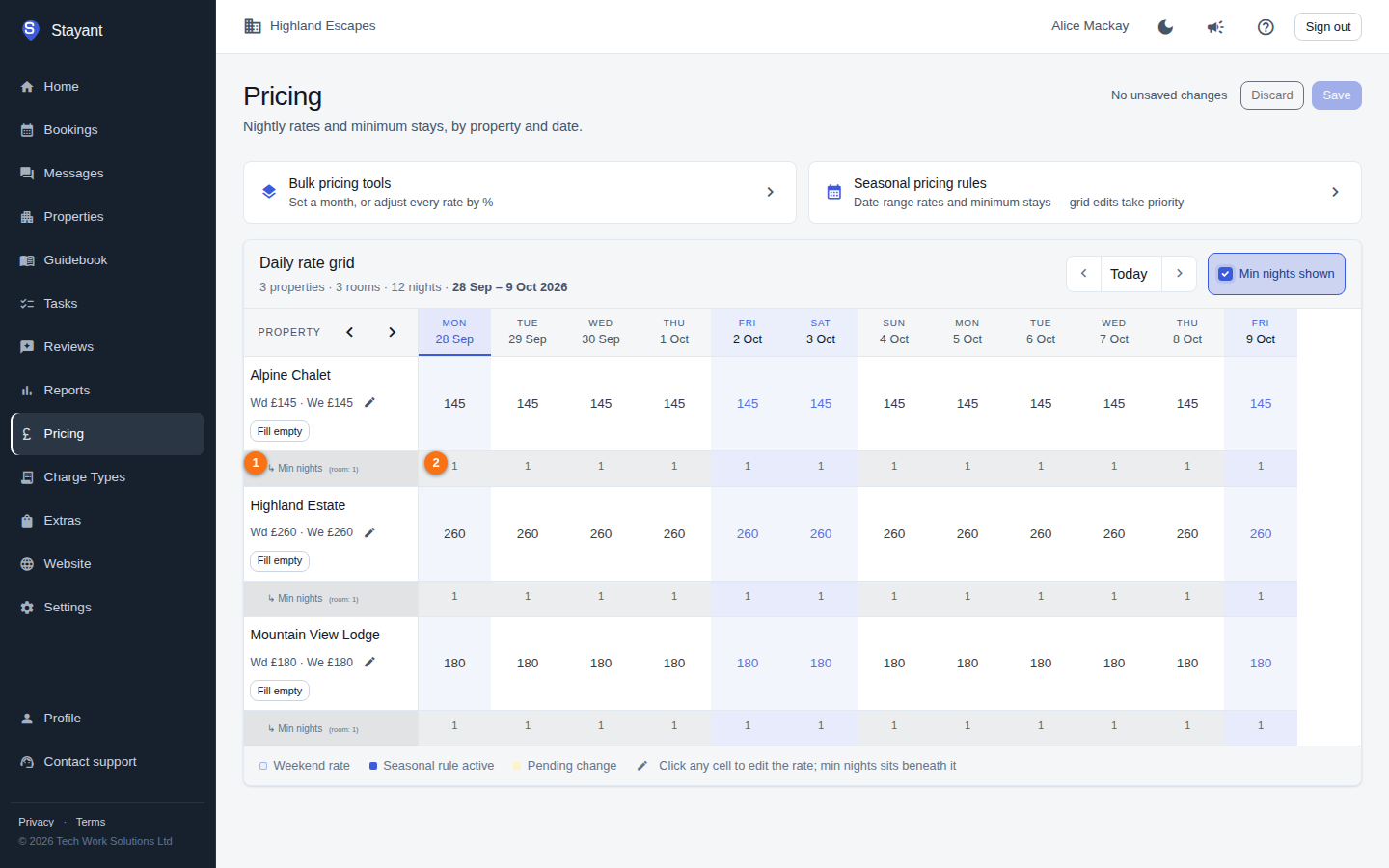
In the daily rate grid, once shown, every room has a Min nights sub-row directly beneath its rate cells. The row label (①) shows the room's default in brackets — for example (room: 2) — so you can see what applies when no per-date value is set.
Set a minimum for a single date
- Find the room's Min nights row (①) and the date's column.
- Type the number of nights into the cell (②). It must be 1 or more. The cell turns to its pending style.
- Click Save in the page header to commit your pending changes.
To remove a per-date value, click the small × (clear override) button in the cell. The date falls back to the room's default minimum on the next save.
Set minimums for a whole month
The Set prices bulk tool includes a Min nights field. Choose a month, optionally enter a min-nights value alongside (or instead of) prices, pick the rooms, and click Apply to grid. See Setting nightly rates for the full bulk workflow.
Gotcha: Per-date min-nights edits are pending until you click Save, just like rate edits. An empty or invalid entry is treated as "clear" — the date reverts to the room's default.
How minimums relate to other settings
There are four layers of minimum-stay control. Stayant checks them most-specific first and uses the first one that has a value:
- Per-date min nights — the Pricing grid values described above, for fine-grained control of specific dates.
- A seasonal pricing rule's Min nights — a rule can set a minimum stay for its date range, with or without setting prices. See Seasonal & weekend pricing.
- A restriction override's min stay — on the property's Restrictions tab, scoped to a room and optionally to a single rate plan.
- Room default minimum — set on the property's General tab as Minimum Stay (nights) for a single-room property, or on each room's card on the Rooms tab as Min nights. This applies to every date nothing else covers.
Restrictions apply to your own bookings too. Minimum stay and the other Restrictions-tab rules — max stay, stop-sell, and closed to arrival/departure — are sent to your connected channels and checked on bookings made on your website and by staff. When a staff booking breaks one, Stayant shows the restriction in a warning and staff can choose Book anyway; the override is recorded in the booking's audit log. To close a date outright, you can also use Block Dates on the Bookings calendar (see Blocking dates & managing availability).
Use the Pricing grid's Min nights row when you want to tune individual dates without changing the room's overall default.