Charge types
A charge type is a reusable, named charge that you define once and then apply to bookings — for example a cleaning fee, a security deposit, a city/tourist tax, or a card-handling fee. Defining it here puts it in your account's charge catalogue; how it actually lands on a booking depends on the usage permissions and behaviour flags you give it (see below).
Open Charge Types from the main menu (/settings/charge-types). Click New Charge Type (①) to open the create form. When you have charge types, the page lists each one (②) with its name, calculation type, default amount, default cost, behaviour flags, and active/inactive status.
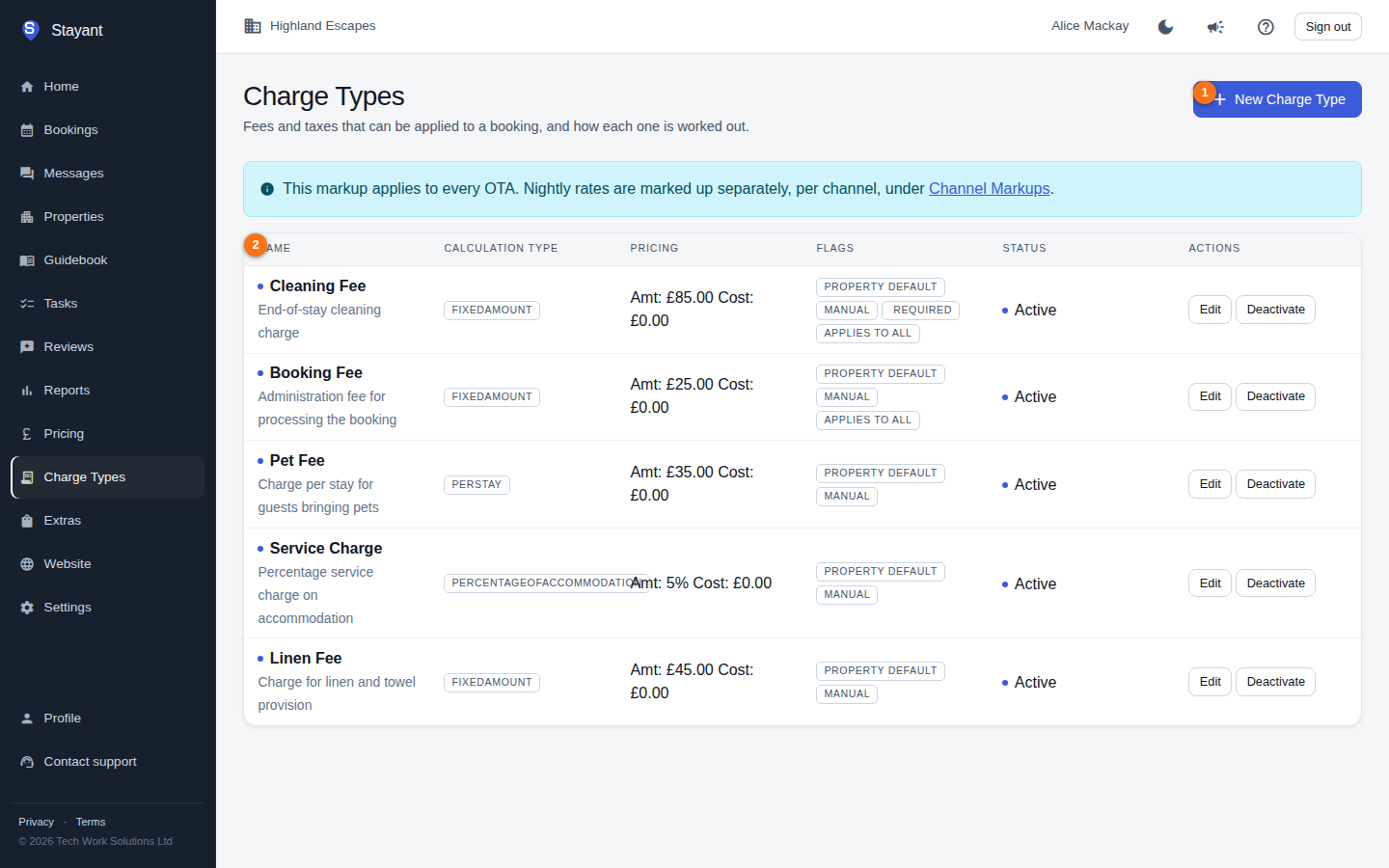
Creating or editing a charge type
Click New Charge Type (or Edit on an existing row; on a phone, tap the row) to open the form. The fields at the top are Name (①), Calculation Type (②), and Default Amount / Rate (③):
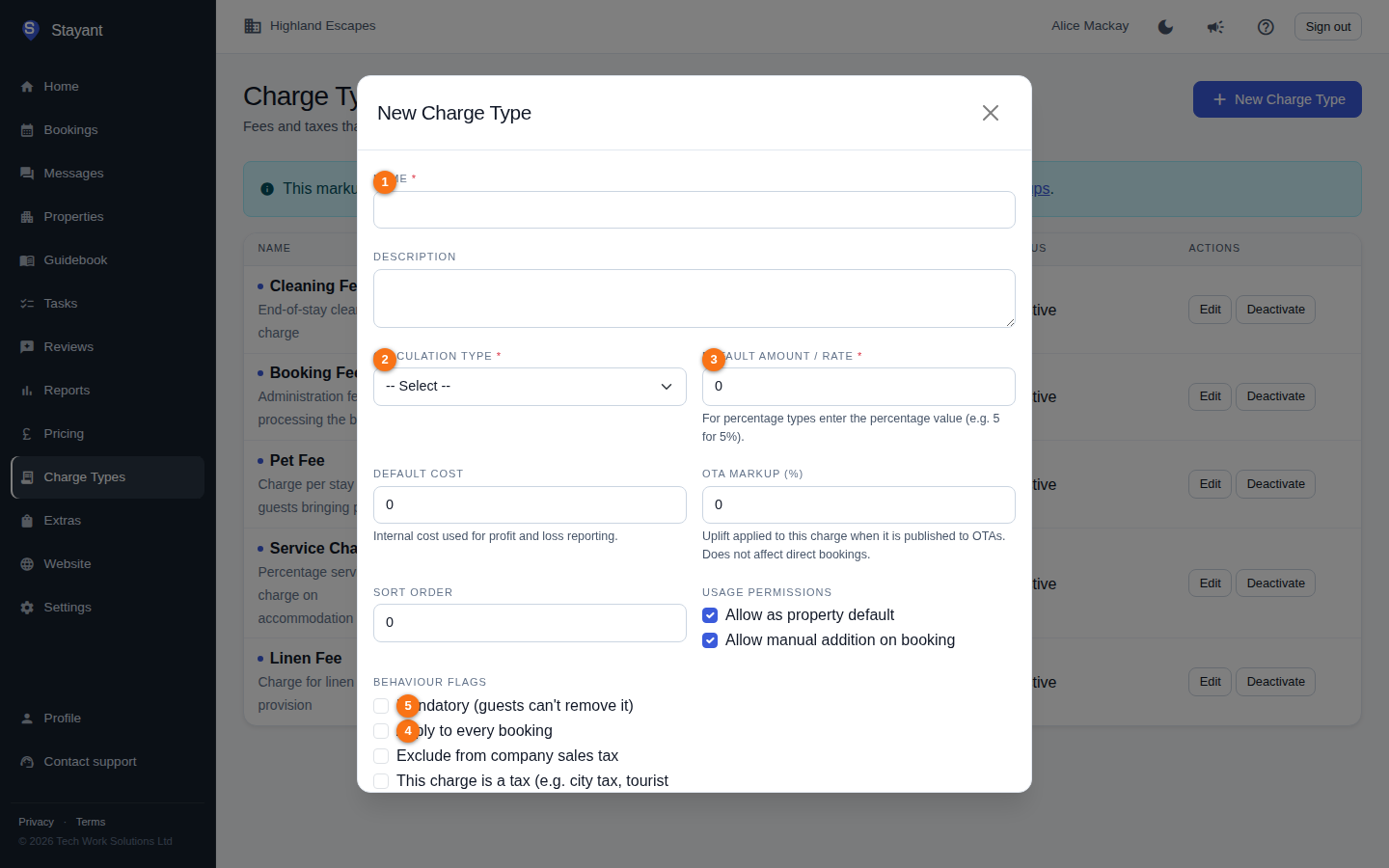
- Name (①, required) — what the charge is called, e.g. "Cleaning fee".
- Description — optional free text.
- Calculation Type (②, required) — how the amount is worked out:
- Fixed Amount — a flat sum.
- Per Night — multiplied by the number of nights.
- Per Stay — once per booking.
- Per Guest — multiplied by the guest count.
- Percentage of Accommodation — a percentage of the accommodation total.
- Default Amount / Rate (③, required) — the default value. For the percentage type, enter the percentage value (e.g.
5for 5%). Percentage charges are shown as a percentage (e.g. 5%) — not a currency amount — throughout the charge type list, property charges, and a booking's charge table. - Default Cost — your internal cost for this charge, used for profit-and-loss reporting. Not shown to guests.
- OTA markup (%) — an uplift applied to this charge when it is published to your booking channels (OTAs). It never affects direct bookings. See OTA rate and charge markups.
- Sort Order — controls ordering in lists.
Usage permissions
These control where the charge type is allowed to be used:
- Allow as property default — it can be set as a Property Charge on individual properties (see How it lands on a booking below).
- Allow manual addition on booking — staff can add it manually to a booking.
Behaviour flags
- Apply to every booking — the charge is added automatically to every new booking in your account, with no per-booking action needed. This is the tenant-wide baseline; a property can still override, disable, or add to it with its own Property Charges.
- Mandatory (guests can't remove it) — makes the charge mandatory wherever it's applied. Wherever this charge type reaches a booking automatically (via Apply to every booking) or through a Property Charge, the resulting booking charge can't be removed — only edited — and the Mandatory checkbox on the Property Charge row is forced on and locked for it. Charges added manually to a single booking aren't affected by this flag — see Adding charges & extras.
- Exclude from company sales tax — this charge is left out of your company sales-tax calculation.
- This charge is a tax — marks the charge as itself being a tax (e.g. city tax, tourist tax, property tax). Tax-flagged charges are grouped under their own Taxes heading, separate from other fees, on the guest quote and on a booking's Charges table.
Click Save to store the charge type.
Activating and deactivating
Each charge type is Active or Inactive. Use the Deactivate / Activate buttons on a row to toggle it. Inactive charge types stay in the catalogue but aren't offered for new use. Charge types are deactivated rather than deleted, so existing bookings that already use them are unaffected.
How it lands on a booking
There's no separate "default charges" list to manage — a new booking's charges are built directly from your charge type flags:
- Every active charge type with Apply to every booking ticked is added automatically, account-wide. This is the baseline.
- On a property's Prices tab, the Property Charges section can override that baseline for just that property — disable a baseline charge, override its amount/quantity/mandatory setting, or add a charge type (with Allow as property default ticked) that isn't part of the baseline at all.
- A charge type marked Mandatory always locks as non-removable wherever it lands — automatically or via a Property Charge — regardless of the property-level setting.
Changes to these flags or to Property Charges only affect bookings created afterwards; existing bookings keep the charges they were created with. Staff can still add charges manually to an individual booking — see Adding charges & extras — independently of either mechanism above.
How this relates to extras
- Charge types (this page) are the catalogue of charges your business levies — fees, taxes, deposits. Each has a calculation type and a default amount.
- Extras are optional paid add-ons (early check-in, cot hire, breakfast) that you or a guest can choose to add. They are a separate catalogue with their own pricing model and online-booking visibility.